Posts

Keeping those bookmarks synchronized

Image
I'm torn. On one hand I like Firefox because of the incredible array of add-ons, especially for developers building web applications. On the other hand I love the performance I get from Safari and with the release of the version 4 public beta many of the new features. As a result I find myself jumping between the two browsers all the time, often keeping both open (one for browsing, one for my current web development project). Compound this with the fact that I have two Macs I use frequently—a Mac Pro and a MacBook Pro for meetings and travel—and my bookmarks are all over the place. I even have Firefox running on my Ubuntu workstation and would like my bookmarks there too. Fortunately I found a great solution for this problem: X-Marks . Though it started out as an add-in for Firefox they recently changed their name from FoxMarks to X-Marks and have started adding more browser support. They now have a Safari add-on and this has solved my little bookmark problem. X-Marks is backed by...
Two tips for Tabbing your way through a Mac

Image
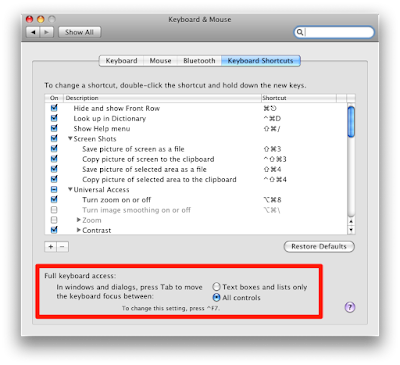
When I switched to Mac from Windows I had an adjustment period. The window model is a bit different, the menu is in a different location, the Dock Bar != the Start menu, etc. Those all took a little adjustment period but I quickly overcame them as obstacles to productivity. By far the longest adjustment period involved the use of the keyboard and more specifically the use of the Tab key. For all of the keyboard power of a Mac (shortcuts are virtually everywhere) the Tab key seems to be forgotten on most Mac keyboards, yet that is probably the most used navigation key on Windows. Here are a couple of tips for making your Mac keyboard experience leverage the Tab key: Enabling Tabbing The first thing you will want to do is to enable tabbing in dialog/pop-up windows. For some reason Apple decided to make that an option you need to manually enable in order to tab your way through all of the controls on a modal dialog. You can change this by going to System Preferences / Keyboard & Mouse...

Nambu makes Twitter feel natural for Mac users

Image
For a while now I've been using TweetDeck to access my Twitter account. While I love many of the features that TweetDeck has made popular I always struggle with the UI. Though it's quite usable the fact that it's built on top of Adobe Air means it doesn't look quite right on my Mac's OS X desktop. I've tried a number of different Twitter clients for Mac but none worked quite as well as TweetDeck did for me. Then along came Nambu , which is still in beta. Nambu looks and feels like a normal OS X application. The design is similar to TweetDeck in some respects but has some key enhancements that make it much more powerful. Multiple Twitter Accounts I have two Twitter accounts that I use: dalison and sharedstatus . The former is my personal account where I ramble on about my blog, Macs, sports and things I find amusing on the Interwebs. The latter is an account for my main product and I use it to announce features and generally cover business related topics. Fort...

My top 5 ways to make Twitter better

Image
I'm finding myself using Twitter more and more these days and not for putting out tweets about what I'm doing at the moment. Twitter is slowly replacing my RSS reader as my vehicle of choice for news I care about, whether it's general, technical, Mac specific or sports related. I've used it to promote my new company ( SharedStatus ), chat with friends about topics I care about, help people with Mac and Ruby on Rails specific questions and generally build up a network of people I like to chat and network with. I can ask a question on Twitter and usually get an answer almost immediately. For these and lots of other reasons I've found Twitter to be a great addition to my online experience. While I really like Twitter I know it can be improved so here are my top 5 features/changes for making Twitter better: 1) Make ReTweets fundamental ReTweets (usually abbreviated RT in tweets) are likely the most powerful networking component of Twitter. When you find something of va...

MacHeist 3 Bundle - some great apps

Image
In the unlikely event you haven't heard of the MacHeist 3 Bundle allow me to introduce you. MacHeist is a collection of applications available for a dramatically reduced price. A significant portion of the proceeds go to a variety of 10 different charities, which you can designate when you purchase or simply let MacHeist evenly distribute to all. I've heard some people complain that this devalues ISV software, a claim I find ridiculous. The single most challenging problem every ISV faces is getting people to learn about their software. The more people that are exposed to it, the more likely you are to "get the word out". It also gives the ISVs the opportunity to be associated with a really good cause; as I write this blog post over $342K have been raised for charities. Everyone wins in this scenario; the buyers gets a great deal, the ISVs get some great exposure and the charities get money at a time when donations have dropped precipitously during this economic reces...

Need to shorten URLs? Give Bit.ly a try

Image
I always ignored URL shortening services in the past; what was the point? My e-mail systems always seemed to handle URLs automatically, forums that I frequented usually shortened the URLs for me and more often than not if I needed a URL in a blog post I created a hyperlink. It wasn't until I started using Twitter quite a bit that I started to appreciate a really small URL. When you have 140 characters to express your thoughts and you are as verbose as I am, every single character counts. Not long ago I noticed a buddy using Bit.ly to shorten his URLs. Up until then I always thought of TinyURL.com but 5 fewer characters in the domain name alone is substantial so I thought I'd give it a try. I give it my long URL, it gives me back a short URL and then I send that out to people. End of story, right? Well, not quite. Bit.ly does two things that have made it a top service for me, one that I use frequently and recommend to friends. The first is that they provide a small JavaScript...

Got kids that play sports? Learn about concussions

Image
It was bitterly cold last night as my wife and I sat in the stands to watch my son's varsity lacrosse game against the cross-town team. Many of these kids had competed on the same junior league teams growing up and as a result there is a fierce competition when they play against one another. Pride was on the line and the hitting was hard, the emotions high. It was late in the third quarter and my son, a 17 year old mid-fielder, was racing to pick up a loose ball. He saw an opponent angling for the ball and had the advantage on him but didn't see a second one racing in from a sharp angle. Just as he bent over to scoop up the ball the unseen player tried to check my son in the shoulder to knock him off balance but missed and struck him hard on the left side of his helmet with his stick. The ref did not see the blow and play continued. My son rolled on the ground and popped right back up but didn't look quite right. He stayed in the game but from the stands we could see that h...